Usage Patterns
Shell mode vs command mode
Section titled “Shell mode vs command mode”- Shell mode (default): opens a normal interactive shell (
bash,zsh, etc.). - Command mode: starts one command when a browser client connects.
Use command mode for dashboards and focused UIs:
term-serve btopterm-serve htop -d 5term-serve --cwd ~/projects term-serve --helpKeyboard flow
Section titled “Keyboard flow”The browser UI is optimized for terminal-first input:
- Keymaps palette for quickly sending common key sequences.
- Desktop key handling that maps cleanly to PTY input.
- Resize handling to keep columns/rows in sync with viewport changes.
Mobile flow
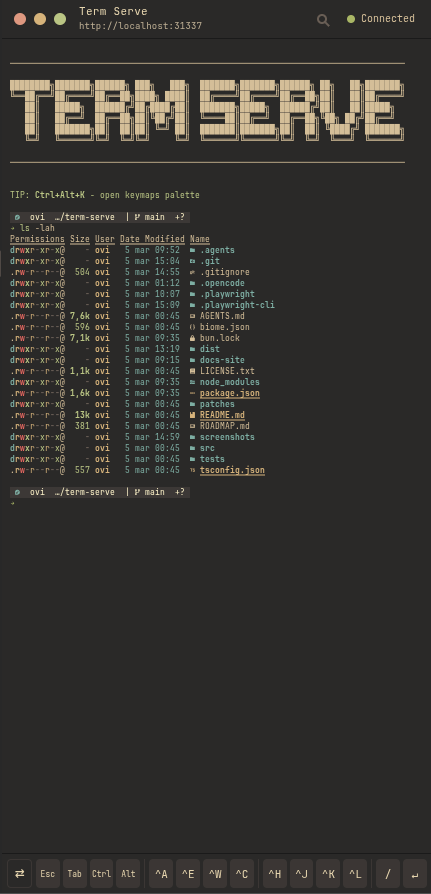
Section titled “Mobile flow”Mobile gets an on-screen toolbar for terminal controls that are hard to reach on touch keyboards:
- Esc / Tab / arrow keys
- Sticky Ctrl and Alt modifiers
- Touch-friendly interactions that keep focus on the terminal
Copy and paste behavior
Section titled “Copy and paste behavior”term-serve includes built-in clipboard flows and fallbacks:
- Regular clipboard read/write where browser permissions allow it.
- Mobile copy mode with selection handles and one-tap copy for scrollback-heavy output.
Exit safety
Section titled “Exit safety”By default, the client warns on likely accidental shell exits (Ctrl+D, exit, logout) to reduce tab-close or command muscle-memory mistakes.